Trainer Card
You can find all of the required information for the reset on your trainer card. The trainer card is accessed by going to the pause menu and selecting your name.
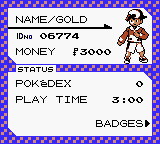
| Field | Information |
|---|---|
| Trainer Name | First line, 1-7 character string; case-sensitive |
| Trainer ID | Second line, 5 digit number; between 00000-65535 |
| Money | Third line, 6 digit number; between 0-999999 |
Title Screen Key Combination
Restart the game and hold the following buttons (according to your region and game) on the title screen to access the RTC reset menu:
EU/US Gold & Silver
On the title screen (with the logo and legendary):- Hold:
- ↓ + SELECT + B
EU/US Crystal
KOR Gold & Silver
- Hold:
- ↓ + SELECT + B
- Release:
- ↓ + B
- Keep holding SELECT
- Hold:
- ← + ↑ + SELECT
- Release:
- SELECT
This menu does not exist in Japanese versions of the games.
Select Yes when the game asks to reset the clock.
Enter the password you generated and press A to confirm.
The game will reset the RTC and you will be able to set the time the next time you start the game.
Make sure to save after setting the clock, or you'll have to set it again.
Special Characters
Some special characters in the game are not available on the keyboard. Use the table below to replace them with the correct characters:
| Character | Replace with | |
|---|---|---|
| PK | → | { |
| MN | → | } |
| × | → | × |